
Everything you expect from a billing system
Laid out the way hosting companies already work, so nobody has to learn anything new.
Billing and invoicing
Products with billing cycles, setup fees and a price for every currency. Invoices with line items, partial payments, credit, refunds, late fees, PDF and print, numbering formats and two levels of tax.
Automation
Renewal invoices, reminders, three overdue notices, late fees, suspensions, terminations, domain notices and syncs, ticket auto-close and a daily summary, all from one cron job.
Client management
Client groups, custom fields, contacts and sub-accounts with permissions, credit balances, notes, e-mail history and Login as Client.
Support desk
Tickets with departments, priorities, attachments, notes, predefined replies, merges, escalation rules and feedback; a knowledgebase, announcements, downloads and network status.
Domains
A price per year for every extension, domain search with bulk search and transfers, WHOIS, nameservers, contacts, EPP codes, locks and renewals, through registrar modules.
Provisioning
Create, suspend, unsuspend, terminate and change packages by themselves with the AIOhPanel, cPanel, DirectAdmin, Plesk and Auto Release modules, with usage bars and one-click login for clients.
Payments
bKash, Nagad, SSLCommerz, PayPal, Stripe, Razorpay, Paystack, bank transfer and manual mobile wallets, each with its own fee, instructions and callback address.
Reports
Income, annual income, client growth, product sales, domain renewals, overdue invoices, taxes, ticket ratings, transactions, forecast and aging, each with a CSV export.
Security
Administrator roles with fine permissions, two-factor sign-in, sign-in lock-outs and IP bans, API credentials with IP limits and a fraud check on new orders.
Developer API
A JSON API with 77 actions, an identifier and a secret, API roles and allowed IP addresses, to connect a website, an app or your own scripts.
Plugins and themes
Gateways, registrars, provisioning, fraud checks and SMS notices are plugins; themes change the admin and client areas. Add your own from a zip.
English, Bengali, currencies and tax
English and Bengali on every page, several currencies with exchange rates, and two levels of tax.
Admin Area
Everything you and your staff do all day, one click from the top menu: clients, orders, invoices, support, reports and every setting.
Dashboard, search and reports
- Tiles for pending orders, overdue invoices, tickets awaiting reply and income this month
- Widgets you can fold: income, recent activity, to-do items, noticeboard, network issues
- One search for clients, domains, orders, invoices, tickets and transactions
- Income, client growth, product sales, domain renewals, taxes and aging reports with CSV export
- Activity, admin, module and e-mail logs, WHOIS lookup, system health
Clients
- A client list with search, groups and bulk actions
- A record with every tab: summary, profile, contacts, services, domains, invoices, quotes, tickets, e-mails, notes, log, credit
- Login as Client in one click
- Client groups with a discount, suspension exemption and separate invoices
- Mass mail, custom client fields and credit balances
Orders
- Pending, active, fraud and cancelled order lists
- Accept an order, mark it as fraud, cancel it or refund it
- Add an order for a client by hand
- Fraud checks on every new order
- Upgrade, downgrade and cancellation requests
Invoices and payments
- Invoices with line items, partial payments, credit and refunds
- PDF and print views, numbering formats, two levels of tax
- Transactions, offline payments and the gateway log
- Quotes that turn into invoices
- Billable items and several currencies
Support desk
- Tickets with departments, statuses, priorities, flags and assignment
- Predefined replies, internal notes, merge and split
- Escalation rules and client feedback ratings
- Knowledgebase, announcements, downloads and network issues
Roles and settings
- Administrator roles with a permission for every page
- General, automation and mail settings with SMTP
- More than 50 e-mail templates with merge fields
- Products, addons, options, promotions, provisioning and order forms
- Domain pricing, registrars, gateways, themes, languages, security

Client Area
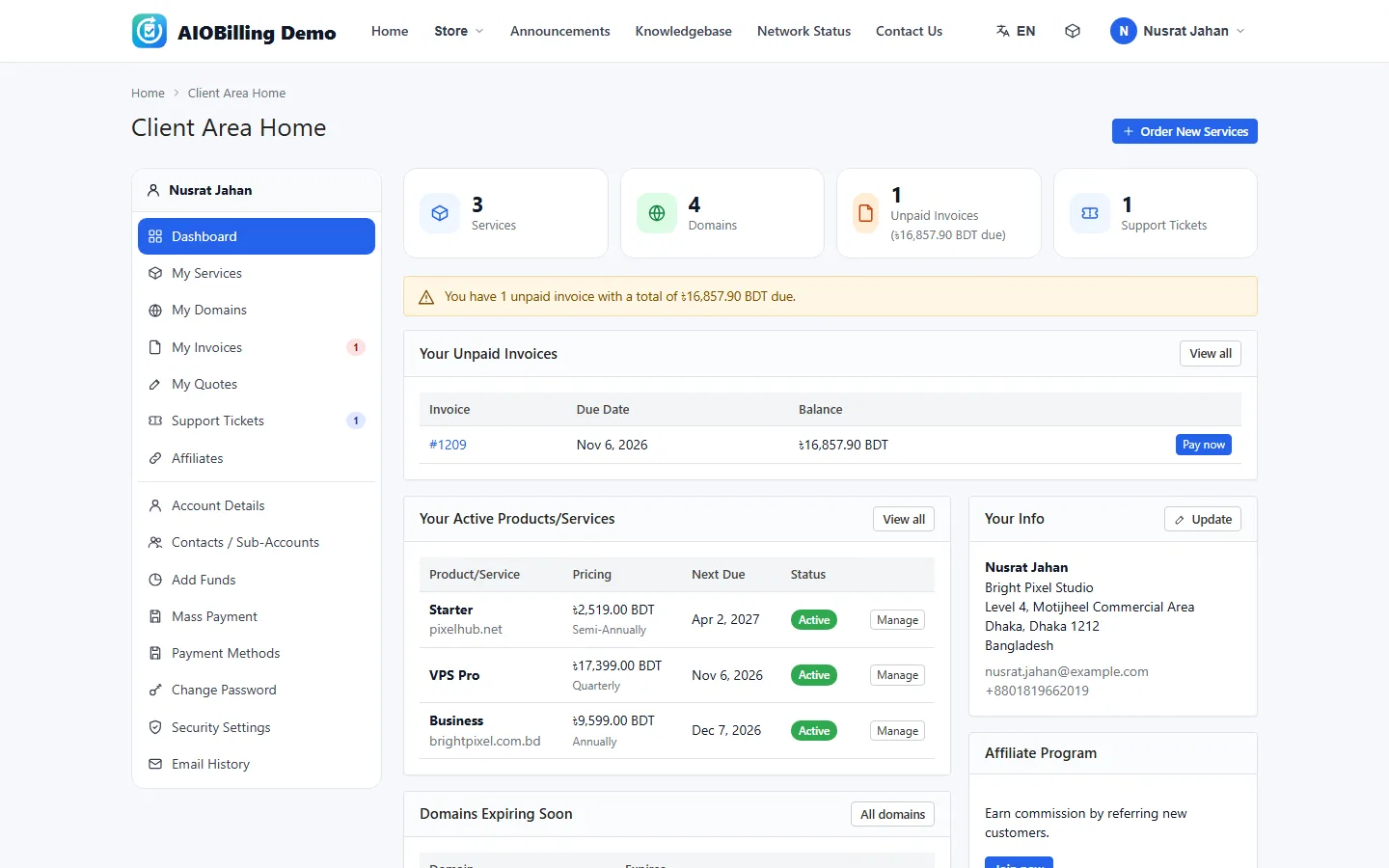
The account your clients get: they pay invoices, manage services and domains, open tickets and find answers by themselves, under your own logo and colours.
Dashboard and account
- Tiles for services, domains, unpaid invoices and tickets
- Unpaid invoices with a Pay now button
- Domains that expire soon, with Renew
- Account details, preferences and e-mail history
Services
- Status tabs, search and a Manage button for each service
- Login to the hosting account in one click, with disk and bandwidth bars
- Change the account password
- Upgrade or downgrade with the prorated amount
- Change the billing cycle or request cancellation
Domains
- Register or transfer a domain
- Nameservers and contact information
- Registrar lock and the EPP code
- DNS management, ID protection and e-mail forwarding
- Renew now, or put the renewal in the cart
Invoices and payments
- Invoice lists by status, with PDF and print
- Pay with the gateway shown on the invoice
- A pay link in every e-mail that works without signing in
- Mass payment, account credit and add funds
- Quotes the client can accept or decline
Support and help
- Open tickets with a department, related service, priority and attachments
- Rate the answer from one to five stars
- Knowledgebase with search and popular articles
- Announcements with RSS, network status and downloads
Security and team
- Two-factor sign-in with an authenticator app
- Active sessions with sign out
- Contacts and sub-accounts with their own permissions
- An affiliate programme with a referral link and withdrawals
Store & Order Forms
Where visitors become clients: product groups in three order-form looks, configurable options, a domain search and a checkout that creates the account in the same step.
Product groups and looks
- Standard cards, a comparison table or a price slider for each group
- A headline, a tagline and a list of ticks for each group
- A Popular ribbon for featured products
- Stock control with Out of Stock shown clearly
- Hidden groups that still open from a direct link
Options and addons
- Billing cycle boxes with the price and the setup fee
- Configurable options: drop-downs, radio buttons, yes/no and quantities
- Addons with quantities
- An order summary that updates as the visitor chooses
Prices and promotions
- A price for every currency and billing cycle
- Promotion codes with a clear answer when a code cannot be used
- Pro-rata billing
- A free domain with a product
- Tax shown as an estimate before sign-in
Domain search
- Availability shown at once, without leaving the page
- Bulk search of up to 20 names
- Transfer in with the EPP code
- A price table for register, transfer and renew
Cart and checkout
- Edit or remove lines and choose the domain period
- Create the account or sign in at checkout
- A payment method for every active gateway, with its fee
- Terms of service tick, notes and a security check
After the order
- The confirmation shows the payment form on the same page
- E-mails to the client and to your staff
- A fraud check, then free and paid orders accepted by themselves
- Renew a domain or order addons later

Automation
One cron job every five minutes does what you would otherwise do by hand: renewal invoices, reminders, late fees, suspensions, domains and tickets.
Invoices and reminders
- Renewal invoices made before the due date
- A payment reminder, then three overdue notices
- Late fees added once per invoice
- Account credit applied by itself
Suspension and termination
- Automatic suspension after the days you set
- Unsuspend when the invoice is paid
- Automatic termination, off until you switch it on
- Cancellation requests carried out now or at the end of the period
- Exemptions for clients and services
Domains
- Renewal invoices before a domain expires
- Renewal notices on the days you choose
- Expired domains moved to grace, redemption or expired
- Expiry date and status synced from the registrar
Support
- Quiet tickets closed after the hours you set
- Escalation rules run every hour
- Tickets assigned automatically
Clients and money
- Inactive clients marked and cleaned up
- Exchange rates updated daily
- Affiliate commissions cleared on their date
- Disk and bandwidth usage read from the provisioning modules
Watching it work
- A heartbeat shown on the dashboard
- An Automation Status page with every job, its time and failures
- A daily summary e-mail to your administrators
- A web cron address when your host has no cron
One cron line runs everything
*/5 * * * * php /home/USER/public_html/cron/cron.phpRun it every 5 minutes. The daily jobs run once a day after the hour you set.
- Generate invoicesDaily
- Reminders and overdue noticesDaily
- Late feesDaily
- SuspensionsDaily
- TerminationsDaily
- CancellationsDaily
What comes in every licence
- Client area with store, domain checker, cart, checkout, services, domains, invoices, quotes, tickets, knowledgebase, announcements, network status, downloads, affiliates
- Products with billing cycles, pricing per currency, setup fees, configurable options, addons, promotions, stock, pro-rata, free domains, upgrades
- Invoices with line items, tax rules (two levels), credit, partial payments, refunds, late fees, PDF and print, numbering formats
- Payment gateways: bKash, Nagad, SSLCommerz, PayPal, Stripe, Razorpay, Paystack, bank transfer, mobile wallets (manual)
- Domains: TLD pricing per year, registrar modules (Namecheap, ResellerClub, GoDaddy, manual), WHOIS lookups, renewals, transfers, nameservers, contacts, EPP
- Provisioning modules: AIO Panel, cPanel / WHM, DirectAdmin, Plesk, Auto Release; create, suspend, unsuspend, terminate, change package, usage, one-click login
- Support: tickets with departments, priorities, statuses, attachments, notes, predefined replies, merges, escalation rules, feedback; knowledgebase; announcements; network issues
- Automation: renewal invoices, reminders, overdue notices, late fees, suspensions, terminations, domain notices and syncs, ticket auto-close, affiliate clearing, exchange rates, daily summary
- Admin area with roles and permissions, dashboard widgets, intelligent search, notifications, activity / admin / module / e-mail logs, reports with CSV export
- E-mail templates with merge fields (50+ built in), SMTP or PHP mail, branded frame, per-client e-mail history
- External API in the WHMCS style (identifier + secret, 70+ actions), API roles, cron with heartbeat
- Clients with groups, custom fields, contacts and sub-accounts with permissions, credit balances, two-factor, e-mail verification, security logs
- Plugins (free and premium) and themes with zip upload; English and Bengali translated on the way out
- Runs on any PHP 7.4+ / MySQL host (cPanel shared hosting is enough); installs in two minutes
System requirements
- A web host or server with PHP 7.4 or newer (8.x recommended) and MySQL 5.7+ / MariaDB 10.3+
- PHP extensions pdo_mysql, curl, json, mbstring, openssl, zip (gd and intl recommended)
- A domain or sub-domain pointed at the folder (the licence is bound to it)
- A cron job every 5 minutes (or a web cron) for the automation
- Merchant accounts at the payment gateways you want to offer; registrar API accounts for automatic domain registration

Ready to run your billing?
Pick a plan and install AIOBilling on your hosting.